
HubSpot Beta: run weekly Sales, Marketing, Support, and Success reviews on live HubSpot metrics.
ApplyHubSpot Beta: run weekly Sales, Marketing, Support, and Success reviews on live HubSpot metrics.
ApplyDashboards organize the conversation. Objectives define the outcome. Metrics explain what is driving it. Meeting Mode turns that into an agenda, decisions, and follow-through.
HubSpot-first for the beta. Built to become your Single Pane of Growth™ across systems over time.
HubSpot is a registered trademark of HubSpot, Inc. Ndever is independent and not endorsed by HubSpot.
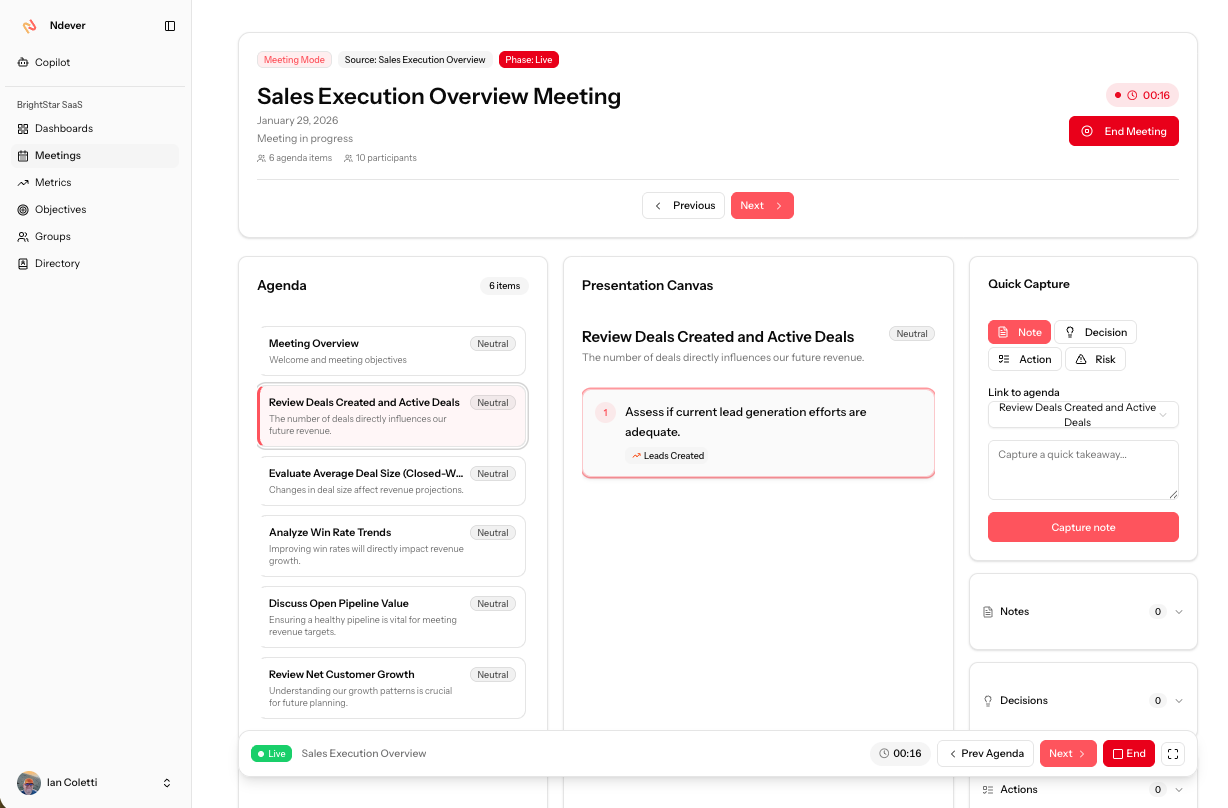
Meeting Mode keeps the agenda, drill-down, and summary in one flow.
See Meeting Mode ↓Ndever is built for a recurring leadership cadence. It reduces prep, makes risk visible earlier, and keeps decisions attached to the numbers.
A weekly operating view
Dashboards designed for scan speed and clarity.
Objectives with drivers
Outcomes with the few metrics that explain them.
GVM™ drift visibility
Shows if you are keeping pace, not just current status.
Meeting Mode
Agenda, drill-down, and meeting summary in one flow.
Not a wall of charts. A structured view that matches how leaders talk about the business.
Sales Execution Overview
Start here. Objective health plus the key drivers, visible in one scan.
Sales Objectives tab
A clean list of what is on track, at risk, and off track, with quick context that points to the drivers.
Pipeline Health tab
Answers one question: is pipeline creation and flow supporting the plan, or is it becoming unstable?
Conversion Efficiency tab
Shows whether activity is turning into outcomes. Win rate and deal size trends make slippage obvious early.
Cross-functional tab
Keeps upstream and downstream drivers in view. Marketing and Success signals sit next to the outcomes they influence.
Why this matters
Dashboards are usually where the story breaks. Ndever uses dashboards to keep the story consistent: outcomes, drivers, context, and actions.
Objectives make the outcome explicit. Ndever then keeps the driver metrics attached so the conversation stays grounded.
Outcome first
See objective status, what changed, and which drivers are contributing most.
Surface risk early
Objectives can be at risk even when a single metric looks fine. Ndever highlights mismatches early.
Clear owners
Every objective and metric has an owner so follow-through is explicit.
Consistent review rhythm
Same structure every week so leaders build muscle memory and move faster.
Context attached to numbers
Notes and changes live next to the metric and objective they affect.
GVM™ is how Ndever shows “are we keeping pace” before a target is missed. It compares what you planned to do by now with what actually happened, and what your trend suggests will happen by the end date.
Plan pace
Where the metric should be today to hit the objective by the end date.
Actual progress
Where the metric really is today, using live data and the same cadence each week.
Forecast and confidence
Where you are likely to land by the end date, plus how reliable that forecast looks based on the data.
Plain-English interpretation
If your actual line is below the plan line, you are behind pace. If your forecast end point misses the target, you are on track to miss unless something changes. Confidence tells you how stable that conclusion is, based on the available data.
Metrics are not just charts. In Ndever, metrics carry history, context, and objective alignment so leaders can decide faster.
Metric view
History and trend, with the context that keeps interpretation consistent.
Metric under an objective (GVM™)
The same metric, now evaluated against plan pace, forecast, and target date.
Drill into a driver
When an objective is at risk, you can drill to the specific driver that is moving.
Manual inputs, without breaking the system
Not every driver lives in HubSpot. Ndever keeps a consistent scorecard format so teams can add manual inputs when needed, without turning the weekly review into spreadsheet stitching.
Principle
One operating view. Multiple sources underneath.
Instead of hopping between dashboards, docs, and notes, Meeting Mode keeps the agenda, drill-down, and meeting summary in one place.
1) Start a meeting from the dashboard
Kick off the review with context already loaded so the team can decide faster.
2) Use Copilot to shape the agenda
Ask what changed and what looks at risk. Copilot suggests agenda items based on drift and movement.
Make the screenshots tell the sequence
Keep the story consistent: start meeting, review objective health, drill to a driver, capture decisions, assign next steps, produce summary. Add the remaining Meeting Mode screenshots using the same card pattern so every image expands and reads as a workflow.
We are starting with HubSpot so the product is deep, reliable, and usable in real weekly operating rhythms.
HubSpot is a registered trademark of HubSpot, Inc. Ndever is independent and not endorsed by HubSpot.
Over time, Ndever expands beyond HubSpot to support finance, product, HR, and operations. The operating layer stays consistent.
One operating rhythm. Multiple systems underneath.
Start deep. Expand wide.
If your weekly meetings feel busy but not decisive, this is built for you.
Founders
Clarity without micromanaging or rebuilding reporting every week.
Revenue leaders
A weekly operating view that surfaces risk and priorities early.
RevOps
A consistent scorecard so the org can stop debating dashboards.
A guided beta designed to validate a simple outcome: weekly reviews driven by live metrics, without rebuilding decks or dashboards.
Trademarks: Growth Value Management™ (GVM™), Single Pane of Growth™.
Good fit if you:
Not a fit if you are looking for a general-purpose BI tool or a one-off dashboard project.